BlogGuides
Surfe Pricing 2026: Plans, Credits, and Per-User Cost

By Rahul LakhaneyPublished on: May 20, 2026 · 8 min read · Last reviewed: May 2026
On this page
TL;DR
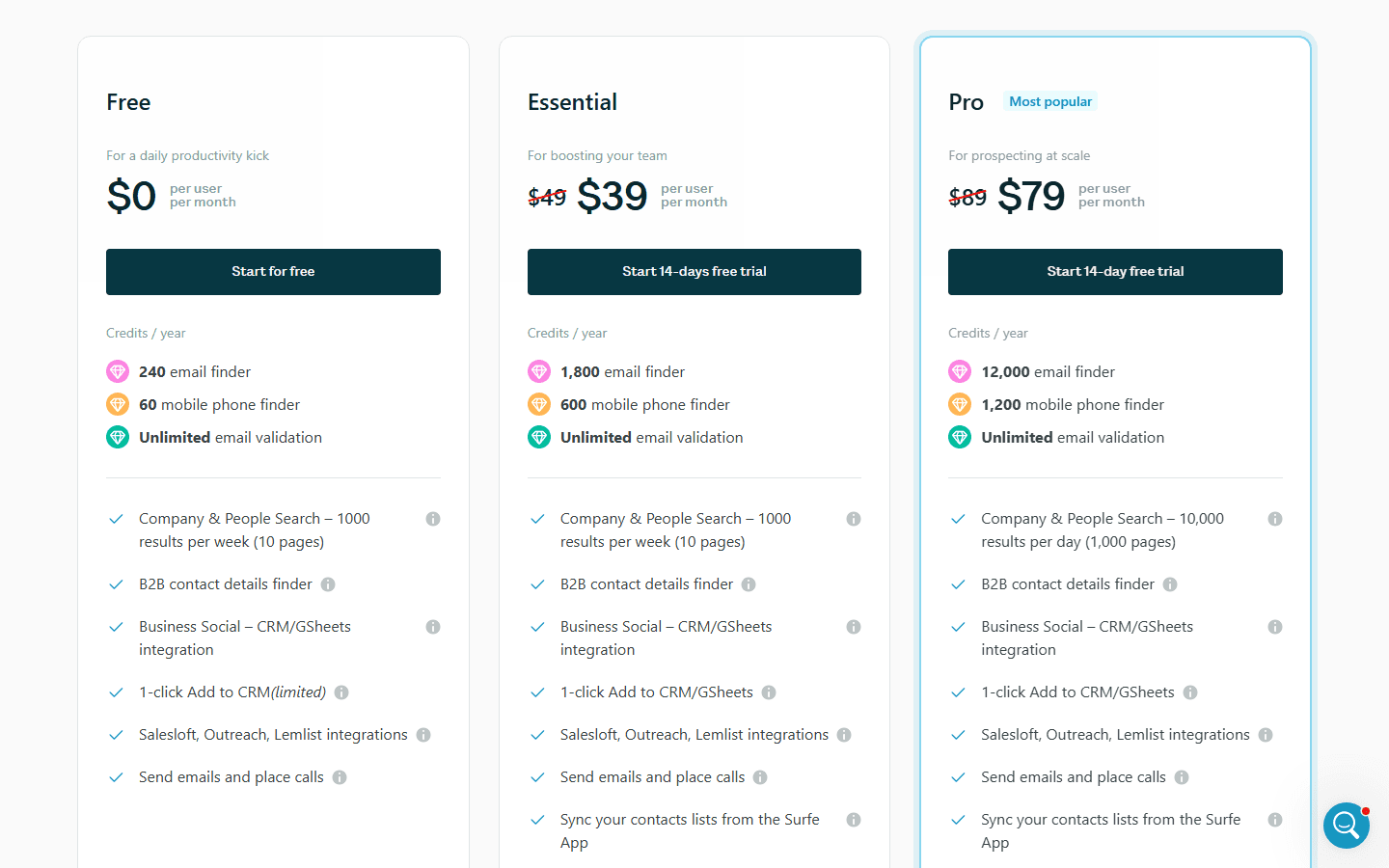
Surfe has four tiers: Free ($0), Essential (around $39/user/month on annual, near $49 month-to-month), Pro (around $79/user/month on annual, near $89 month-to-month), and a custom Business/Enterprise plan. Essential includes roughly 1,800 email finder credits and 600 mobile phone credits per year, unlimited message templates, and CRM sync. Pricing is per user, so a team multiplies the headline fast. Surfe's real value is the CRM Chrome extension that syncs LinkedIn contacts and messages straight into HubSpot, Salesforce, Pipedrive, or Copper, plus waterfall enrichment across multiple data sources. Reported prices vary by source (annual versus monthly billing explains most of the gap), so confirm the current rate on Surfe's pricing page. Most small teams land on Essential or Pro depending on credit needs.
Monthly cost by lookup volume
| Volume | Surfe Essential | Surfe Pro | Enrich Growth | Enrich Scale |
|---|---|---|---|---|
| Listed price (annual) | ~$39/user/mo | ~$79/user/mo | $49 (not per seat) | $149 (not per seat) |
| Per-seat pricing? | Yes | Yes | No | No |
| Mobile credits | ~600/yr | Higher | Waterfall | Waterfall |
Surfe is a CRM Chrome extension first and a data provider second, which shapes its pricing: you pay per user for the LinkedIn-to-CRM workflow, and contact credits come bundled into each tier. This guide breaks down Surfe pricing in 2026, what the email and mobile credit allotments actually buy, and where the per-user model makes sense versus a credit-pool alternative.
Surfe's model has three traits that determine real cost:
Surfe also runs waterfall enrichment (cascading multiple data providers to maximize match rates) and offers API enrichment on higher tiers. Annual billing is cheaper than month-to-month, which is the main reason published prices differ across review sites.
| Plan | Reported price (per user) | Email Credits | Mobile Credits | CRM Sync |
|---|---|---|---|---|
| Free | $0 | Limited | Limited | Basic |
| Essential | ~$39/mo annual (~$49 monthly) | ~1,800/yr | ~600/yr | Yes |
| Pro | ~$79/mo annual (~$89 monthly) | Higher | Higher | Yes + advanced |
| Business / Enterprise | Custom | Custom | Custom | Full + API |
Figures above are reported by third-party trackers (G2, and independent reviews) and reflect annual versus monthly billing differences; confirm current numbers on the Surfe pricing page. Essential is consistently reported at roughly $39/user/month on annual billing with about 1,800 email finder credits and 600 mobile phone credits.
Free plan ($0)
A limited allotment of credits and basic CRM sync through the Chrome extension. It is enough to test how Surfe enriches LinkedIn profiles and pushes them into your CRM, which is exactly the workflow you are evaluating. Treat it as a trial of the extension, not a working tier.
Essential plan (~$39/user/month annual)
Roughly 1,800 email finder credits and 600 mobile phone credits per year, unlimited message templates, contact additions, and CRM sync to HubSpot, Salesforce, Pipedrive, and Copper. Essential is the entry working tier for a rep who lives in LinkedIn and wants contacts and conversations flowing into the CRM automatically. The 1,800 annual email credits work out to about 150 a month, and the 600 mobile credits to about 50 a month, so this tier suits steady, targeted prospecting rather than high volume.
Pro plan (~$79/user/month annual)
Higher email and mobile credit allotments plus advanced CRM features and message sync. Pro is for reps who need more contact volume and the fuller automation layer. The credit step-up is the main reason to move here; if your CRM workflow is light but your contact volume is high, the math may favor a dedicated data tool instead.
Business / Enterprise plan (custom)
Custom credits, API enrichment, advanced admin and team controls, and dedicated support. This is the tier for teams that want to pipe Surfe's waterfall enrichment into their own systems via API. Pricing is sales-gated and quoted by seats and volume.
| Tool | Entry plan | Pricing model | Email/Phone | CRM sync |
|---|---|---|---|---|
| Surfe Essential | ~$39/user/mo | Per seat + bundled credits | ~1,800 email / 600 mobile per year | Native (HubSpot, SF, Pipedrive) |
| Lusha Pro | ~$49/user/mo | Per seat + credits | Credit-based | Yes |
| Apollo Basic | $49/user/mo | Per seat | Yes (8 credits/phone) | Yes |
| Cognism | Custom | Contract | Strong EU mobile | Yes |
| Enrich Growth | $49 (not per seat) | Credit pool | Email + phone via waterfall | HubSpot, Salesforce |
Surfe competes most directly with Lusha on per-seat, extension-driven LinkedIn-to-CRM workflows, and notably it runs its own waterfall enrichment, the same approach Enrich uses. The difference is the pricing model: Surfe charges per user with bundled credits, while Enrich uses a single credit pool with no per-seat fees. For teams that want waterfall enrichment without per-seat multiplication, see the best Surfe alternatives roundup.
Surfe is the right call for sales teams that live inside their CRM and want LinkedIn contacts and conversations synced automatically. The Chrome extension's CRM sync is fast and genuinely useful, and the native integrations with HubSpot, Salesforce, Pipedrive, and Copper are deeper than most data tools offer. For a rep doing targeted, CRM-centric prospecting at moderate volume, Essential is well priced.
Surfe gets expensive or limiting when:
Surfe is one of the better CRM-workflow tools in the category, and the Chrome extension's ability to sync LinkedIn contacts and conversations into your CRM is a defensible reason to choose it. At roughly $39/user/month on annual, Essential is well priced for a rep doing targeted, CRM-centric prospecting, and the fact that Surfe runs its own waterfall enrichment is a genuine plus.
The constraints are the per-user model and the modest credit pools, especially mobile. For a small CRM-focused team, Surfe earns its place. For larger teams, phone-heavy outbound, or anyone who wants waterfall enrichment from a single pool without per-seat fees, compare it against Enrich's pricing or read the Surfe alternatives roundup.
Surfe has a Free plan, an Essential plan at roughly $39/user/month on annual billing (near $49 month-to-month), a Pro plan at roughly $79/user/month annual (near $89 monthly), and a custom Business/Enterprise tier. Essential includes about 1,800 email finder credits and 600 mobile phone credits per year. Pricing is per user, so multiply by team size.
For CRM-centric sales teams that want LinkedIn contacts and conversations synced into HubSpot, Salesforce, Pipedrive, or Copper, yes, the extension and CRM sync are genuinely useful. It is less compelling for large teams (per-user pricing) or phone-heavy outbound (limited mobile credits).
Yes. Surfe cascades multiple data providers to maximize match rates, the same waterfall approach used by Enrich. The difference is pricing: Surfe charges per user with bundled credits, while waterfall-first tools like Enrich use a single shared credit pool.
Yes, a Free tier with limited credits and basic CRM sync through the Chrome extension. It is best used to evaluate the LinkedIn-to-CRM workflow before committing to Essential or Pro.
Both are per-seat, extension-driven LinkedIn prospecting tools. Surfe's differentiator is deeper native CRM sync (contacts and conversations), while Lusha leans on broader contact data. Pricing is similar at the entry tier; the right pick depends on whether CRM workflow or raw data volume matters more.
100 free API credits. No credit card required. Start enriching data in minutes.